✓ A portfolio is your visual resume, showcasing practical skills.
✓ Curate your best work, don't include everything.
✓ Context and process are as important as the final product.
✓ An online presence is crucial for modern portfolios.
How It Works
1
Define Your Goal & Audience
Understand what you want your portfolio to achieve and who you want to impress. This clarity guides all subsequent choices.
2
Curate Your Best Work
Select only your strongest, most relevant projects. Quality over quantity is paramount to making a strong impression.
3
Tell the Story Behind Each Project
Don't just show; explain your process, challenges, and results. This demonstrates your thought process and problem-solving abilities.
4
Choose the Right Platform & Design
Select a platform that suits your needs and design a clean, intuitive layout. Ensure your portfolio is easy to navigate and visually appealing.
Understanding the 'Why' Behind Your Portfolio
Photo: Hanna Pad / Pexels
Before diving into the 'how,' it's crucial to understand the fundamental purpose of your portfolio. Far more than just a collection of your work, a professional portfolio is a strategic marketing tool designed to achieve specific goals: to secure a job, attract new clients, win a freelance contract, or even gain admission to an advanced program. It serves as tangible proof of your skills, expertise, and unique style, offering prospective employers or clients a concrete demonstration of what you can do, rather than just what you say you can do. In today's competitive landscape, especially in creative, technical, and service-based industries, a well-constructed portfolio is often the deciding factor that sets you apart from other candidates. It transcends the limitations of a traditional resume by providing visual evidence and context for your accomplishments, showcasing not just the final product, but also your process, problem-solving abilities, and creative thinking.
Consider your target audience. Are you aiming for a corporate design role, a freelance photography gig, or an engineering position that requires proof of concept? The nature of your audience will heavily influence the types of projects you include, the level of detail you provide, and even the tone and style of your descriptions. For instance, a graphic designer's portfolio might prioritize visual flair and case studies of branding projects, while a software developer's portfolio would focus on code snippets, project architecture, and live demos. By clearly defining your 'why' and understanding your audience, you can tailor your portfolio to resonate directly with their needs and expectations, making it far more effective in achieving your career aspirations. This initial strategic step is non-negotiable; without it, you risk creating a generic collection that fails to make a meaningful impact. Remember, your portfolio is a narrative about your professional journey and capabilities, meticulously crafted to persuade and impress. It’s your opportunity to tell a compelling story about your talent and potential. For more insights on tailoring your approach, explore resources on portfolio examples.
Curating Your Masterpiece: Selecting the Right Projects
Photo: Matheus Bertelli / Pexels
One of the most common pitfalls when building a portfolio is including too much work. The temptation to showcase every project you've ever completed can be strong, but this approach often dilutes the impact of your strongest pieces. Instead, the art of curation is paramount. Think of your portfolio as a gallery exhibition: you wouldn't display every sketch or unfinished piece, but rather a carefully selected collection of masterpieces that best represent your skill, vision, and range.
Aim for quality over quantity. A strong portfolio often features 5-10 exceptionally well-executed projects, rather than 20 mediocre ones. Each project you include should serve a specific purpose: to demonstrate a particular skill, highlight your expertise in a relevant area, or showcase your ability to tackle complex challenges. When making your selections, ask yourself: Is this project representative of my best work? Does it align with the type of opportunities I'm seeking? Does it demonstrate skills that my target audience values?
Diversity within your selected projects can also be beneficial, but only if it's relevant. For example, a web designer might include projects ranging from e-commerce sites to informational blogs, demonstrating versatility. However, including a project from an entirely unrelated field (like a painting from your hobby if you're applying for a software engineering role) might confuse your audience unless it directly showcases a transferable skill like problem-solving or meticulous attention to detail.
Beyond the final output, consider projects that allow you to articulate your process. Employers and clients aren't just interested in what you created; they want to understand *how* you created it. Projects with clear problem statements, iterative design processes, and measurable results are invaluable. If a project has a compelling backstory, a challenging constraint you overcame, or a significant positive outcome, it’s a strong contender for inclusion. Be ruthless in your selection; if a piece doesn't elevate your overall presentation, it's better left out. This careful curation ensures that every item in your portfolio contributes positively to the narrative you're trying to build about your capabilities and potential.
Crafting Compelling Narratives: Telling Your Project Stories
Photo: KoolShooters / Pexels
Simply displaying your work is only half the battle; the other, equally crucial half, is telling the story behind each project. Without context, even the most impressive visual or technical output can fall flat. Prospective employers and clients want to understand your thought process, the challenges you encountered, and the solutions you implemented. This narrative transforms a static image or code snippet into a compelling case study of your abilities.
For each project, aim to provide a concise yet comprehensive overview using a structured approach. A popular framework includes:
* **Project Title & Role:** Clearly state what the project was and your specific contribution.
* **Problem/Challenge:** What problem were you trying to solve? What was the initial brief or objective? This sets the stage and demonstrates your ability to identify needs.
* **Process/Approach:** Detail your methodology. Did you conduct research, sketch ideas, iterate on designs, write specific algorithms, or collaborate with a team? This showcases your working style and strategic thinking. Use visuals like wireframes, mockups, code snippets, or process sketches to illustrate your points.
* **Solution/Outcome:** Present the final result. What did you create? How did it address the initial problem? If possible, include measurable results (e.g., 'increased user engagement by 20%', 'reduced loading time by 15%', 'generated $X in sales'). Quantifiable results are incredibly powerful.
* **Learnings/Reflections:** What did you learn from this project? What would you do differently next time? This demonstrates self-awareness and a growth mindset, qualities highly valued by employers.
Remember to write in a clear, concise, and professional tone. Avoid jargon where simpler language suffices, but don't shy away from technical terms if they're relevant to your industry and audience. The goal is to make your project stories engaging and easy to understand, guiding the viewer through your journey from problem to successful resolution. This narrative element is what truly brings your portfolio to life and distinguishes you from others who merely present their work without explanation. It's an opportunity to showcase not just your technical prowess, but also your communication skills and strategic thinking. For more detailed guidance, consider exploring resources on how to optimize your portfolio for specific roles.
Platform Choices & Common Portfolio Mistakes to Avoid
Photo: Walls.io / Pexels
Choosing the right platform for your portfolio is a critical decision that impacts accessibility, professionalism, and ease of maintenance. For many, a dedicated portfolio website built on platforms like Squarespace, Wix, Webflow, or WordPress offers the most control over branding, design, and content. These platforms provide templates that can be customized to reflect your personal style while ensuring a professional, mobile-responsive layout. Freelancers and designers often gravitate towards these options for their flexibility. Developers might prefer GitHub Pages for code-centric portfolios or even build a custom site to showcase their coding prowess. For visual artists and photographers, platforms like Behance, Dribbble, or even specialized photography portfolio sites offer community features and high-quality image display.
When making your choice, consider your technical comfort level, budget, and the specific features you need. Ensure the platform allows for easy updates, integrates well with other tools (like analytics), and presents your work beautifully on all devices.
**Common Portfolio Mistakes to Avoid:**
* **Including everything:** As discussed, quality over quantity. Don't dilute your best work with mediocre pieces.
* **Lack of context:** Simply showing images or code without explanation leaves viewers guessing. Always provide a clear narrative for each project.
* **Poor quality visuals:** Blurry images, inconsistent formatting, or unreadable text immediately detract from professionalism.
* **Outdated work:** Regularly update your portfolio with your most recent and relevant projects. An outdated portfolio suggests a lack of engagement.
* **No call to action:** Make it easy for potential employers or clients to contact you. Include clear contact information and links to your professional social media profiles.
* **Ignoring mobile responsiveness:** A significant portion of traffic comes from mobile devices. Ensure your portfolio looks and functions perfectly on smartphones and tablets.
* **Typos and grammatical errors:** Proofread meticulously. Errors undermine your credibility.
* **Generic content:** Personalize your portfolio. Let your unique voice and style shine through, even in technical descriptions.
* **Slow loading times:** Optimize images and code to ensure your site loads quickly. Patience is thin in the digital age.
* **No clear focus:** Your portfolio should have a clear purpose and cater to a specific audience or type of role.
Comparison
Feature
Dedicated Website (e.g., Squarespace)
Professional Network (e.g., Behance)
Simple Link (e.g., Google Drive)
Customization & Branding
High (Full control)
Moderate (Profile-based)
Low (Folder structure)
Professionalism
Excellent (Own domain)
Very Good (Industry standard)
Basic (Shared link)
SEO Potential
High (Optimized pages)
Moderate (Platform SEO)
Low (Direct link only)
Ease of Use
Moderate (Learning curve)
High (Intuitive interface)
Very High (Simple file upload)
Cost
$$ (Subscription)
$ (Free with premium options)
Free (With existing accounts)
Target Audience Reach
Broad (Via SEO/sharing)
Specific (Creative community)
Limited (Direct sharing)
What Readers Say
★★★★★
"Following this guide helped me completely overhaul my online portfolio. I landed three new freelance clients within a month, something I struggled with for years. The advice on project storytelling was a game-changer!"
Sarah J. · Austin, TX
★★★★★
"As a software developer, I wasn't sure how to build a portfolio that wasn't just code. This article provided excellent insights on showcasing process and results, not just the final product. My GitHub projects now have much better context."
Mark D. · Seattle, WA
★★★★★
"I used the tips from this article to refine my graphic design portfolio. The structured approach to explaining each project led to an interview offer for my dream job at a top agency. Highly recommend this comprehensive resource!"
Emily R. · New York, NY
★★★★★
"The advice on platform choices was very helpful, though I wish there were a few more specific examples for niche industries. Overall, a solid guide that covers all the essentials for building a strong portfolio. Made me rethink my entire approach."
Chris P. · Chicago, IL
★★★★★
"This guide isn't just for creatives; as a marketing specialist, I adapted the principles to build a portfolio of campaigns and strategies. It significantly boosted my credibility in job applications and helped me articulate my impact more effectively."
Jessica L. · Los Angeles, CA
Frequently Asked Questions
What's the ideal number of projects to include in a portfolio?
Aim for 5-10 of your absolute best and most relevant projects. Quality always trumps quantity. Each project should serve a specific purpose in demonstrating your skills and capabilities to your target audience, providing a comprehensive yet concise overview of your expertise.
I don't have professional experience. How can I build a portfolio?
Don't fret! Create personal projects, volunteer for non-profits, participate in design or coding challenges, or redesign existing websites/apps. These 'passion projects' are excellent for demonstrating initiative, skill, and problem-solving abilities to potential employers or clients.
How do I choose the best platform for my online portfolio?
Consider your industry, technical comfort, budget, and desired level of customization. Platforms like Squarespace or Wix are great for ease of use and visual appeal. Behance or Dribbble suit visual artists, while GitHub is essential for developers. A custom-built site offers maximum control.
Is it worth paying for a portfolio website?
Often, yes. A professional, self-hosted website (e.g., with your own domain) signals seriousness and commitment. While free options exist, paid platforms offer more features, better branding control, and often superior support, leading to a more polished and impactful presentation of your work.
How often should I update my portfolio?
Regularly! Your portfolio should be a living document. Aim to update it at least once a year, or whenever you complete a significant new project that showcases improved skills or new capabilities. Keep it fresh, relevant, and reflective of your current abilities.
Who should use how to build a portfolio?
Anyone looking to visually demonstrate their skills and expertise. This includes designers, developers, writers, photographers, artists, marketers, architects, engineers, and even project managers. If your work has a tangible output or process that can be showcased, a portfolio is invaluable.
What if my work is confidential or under NDA?
You can still showcase these projects by anonymizing client names and sensitive data. Focus on your process, the problem you solved, and the general outcome, rather than specific details. Always check your NDA terms to ensure compliance, or create hypothetical case studies that mirror your experience.
What are the future trends for portfolios?
Expect more interactive elements, AI-powered personalization for viewers, integration with virtual/augmented reality, and emphasis on video case studies. The focus will continue to be on demonstrating problem-solving, adaptability, and measurable impact, often through multimedia storytelling.
Now that you understand the crucial steps on how to build a portfolio that truly stands out, it's time to put these insights into action. Start curating your work, craft compelling narratives, and present your unique talents to the world. Your next big opportunity is waiting.

 Photo: Hanna Pad / Pexels
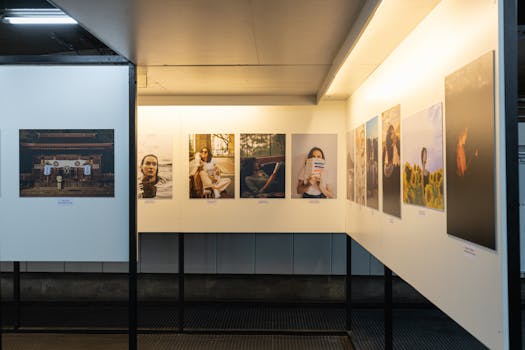 Photo: Matheus Bertelli / Pexels
 Photo: KoolShooters / Pexels
 Photo: Walls.io / Pexels